
PDF Merger – Merge PDF Files Online for Free
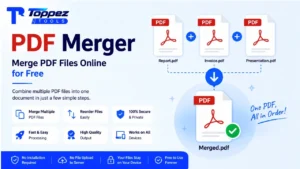
Combine multiple PDF files into one document online for free. Upload, arrange, merge, and download your PDF in just a few clicks.
Merge multiple PDF files into one document with Toppez Tools PDF Merger. Upload your PDFs, arrange them in the order you want, combine them into a single file, and download the result. The tool is simple, fast, and convenient for combining reports, documents, invoices, forms, presentations, and other PDF files.
Smart PDF Merger
Combine multiple PDF documents into a single organized file with instant drag-and-drop ordering and zero server uploads.
Drag & drop your PDF files here
Select 2 or more PDF documents to merge (Max 50MB total)
Managing multiple PDF files can become inconvenient when you need to submit, share, archive, or organize them as a single document. Instead of opening and combining files with complicated PDF software, you can use an online PDF Merger to complete the task quickly.
Toppez Tools PDF Merger lets you combine multiple PDF files into one document. Simply upload your PDFs, arrange them in your preferred order, merge the files, and download the final PDF.
It is useful for combining business documents, reports, invoices, assignments, forms, ebooks, project files, and other PDF documents into one organized file.
Key Features of Toppez Tools – PDF Merger:
1. Merge Multiple PDF Files
Combine multiple PDF documents into a single PDF file. This is useful when related documents are stored separately and need to be shared or archived together.
2. Easy Drag-and-Drop Upload
Upload your PDF files quickly using the file picker or drag-and-drop interface, depending on the tool’s supported functionality.
3. Reorder PDFs Before Merging
Arrange uploaded PDF files in the exact sequence you want before creating the final document. This helps ensure pages appear in the correct order.
4. Simple PDF Merging
Merge your selected documents with a straightforward workflow. Upload, arrange, merge, and download without complicated PDF-editing software.
5. Combine Documents Into One File
Turn multiple PDF files into one convenient document, making sharing, storage, printing, and organization easier.
6. Fast Processing
The tool is designed to complete common PDF merging tasks quickly, depending on file size, number of documents, and device performance.
7. Preview File List
Review the PDFs you have selected before merging. Check the file names and order to reduce the chance of creating the wrong final document.
8. Easy to Use
The simple interface makes PDF merging accessible to beginners, students, professionals, businesses, and everyday users.
9. No Complex PDF Software
You can merge PDFs online without relying on advanced desktop PDF-editing applications.
10. Convenient for Everyday Documents
Use the PDF Merger for reports, invoices, contracts, assignments, applications, receipts, scanned documents, ebooks, and project files.
1. Merge Multiple PDF Files
Combine multiple PDF documents into a single PDF file. This is useful when related documents are stored separately and need to be shared or archived together.
2. Easy Drag-and-Drop Upload
Upload your PDF files quickly using the file picker or drag-and-drop interface, depending on the tool’s supported functionality.
3. Reorder PDFs Before Merging
Arrange uploaded PDF files in the exact sequence you want before creating the final document. This helps ensure pages appear in the correct order.
4. Simple PDF Merging
Merge your selected documents with a straightforward workflow. Upload, arrange, merge, and download without complicated PDF-editing software.
5. Combine Documents Into One File
Turn multiple PDF files into one convenient document, making sharing, storage, printing, and organization easier.
6. Fast Processing
The tool is designed to complete common PDF merging tasks quickly, depending on file size, number of documents, and device performance.
7. Preview File List
Review the PDFs you have selected before merging. Check the file names and order to reduce the chance of creating the wrong final document.
8. Easy to Use
The simple interface makes PDF merging accessible to beginners, students, professionals, businesses, and everyday users.
9. No Complex PDF Software
You can merge PDFs online without relying on advanced desktop PDF-editing applications.
10. Convenient for Everyday Documents
Use the PDF Merger for reports, invoices, contracts, assignments, applications, receipts, scanned documents, ebooks, and project files.
How to Use the PDF Merger?
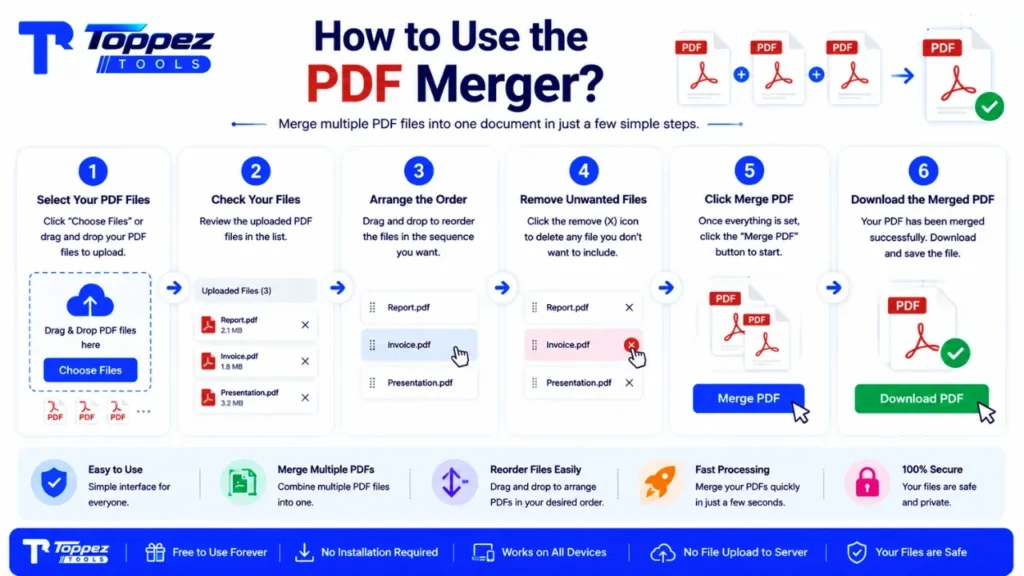
1. Select Your PDF Files
Click the Upload PDF or Choose Files button and select the PDF documents you want to combine.
2. Check Your Files
After uploading, review the list of selected PDFs. Make sure all the documents you need are included.
3. Arrange the PDF Order
Drag and reorder the files if necessary. The order you choose determines how the documents will appear in the merged PDF.
4. Remove Unwanted Files
If you accidentally added a PDF, remove it from the list before starting the merge.
5. Click Merge PDF
Once everything is ready, click Merge PDF to combine your selected documents into one file.
6. Wait for Processing
Allow the tool a moment to process and combine the PDF files. Processing time may depend on the number and size of the documents.
7. Download the Merged PDF
Once the merge is complete, click Download to save the combined PDF to your device.
Why Use This PDF Merger Tool?
1. Save Time
Combine several PDF documents in one workflow instead of manually managing individual files.
2. Keep Documents Organized
A single merged PDF is easier to store, share, email, print, and archive.
3. Easy File Ordering
Arrange documents before merging so the final PDF follows the sequence you need.
4. Free Online Tool
Use the PDF Merger for common PDF-combining tasks without purchasing professional PDF software.
5. Beginner-Friendly
The simple workflow makes the tool suitable even if you have little experience with PDF editing.
6. Useful for Work and Study
Merge reports, assignments, research papers, presentations, forms, invoices, receipts, and other documents into one file.
7. Convenient Anywhere
An online PDF Merger can be accessed from supported devices through a web browser.
Supported Formats & Specifications:
| Feature | Specification |
|---|---|
| Input Format | |
| Output Format | |
| PDF Files | Multiple PDF files |
| File Ordering | Reorder before merging |
| File Removal | Remove selected files before merging |
| Drag & Drop | Supported if implemented |
| Preview | File list / preview, depending on implementation |
| Merge Function | Combine multiple PDFs into one PDF |
| Output Quality | Original PDF content preserved where supported |
| Processing | Online PDF merging |
| Installation Required | No |
| Device Support | Desktop, laptop, tablet, and mobile browsers |
| Cost | Free |
Common Mistakes When Merging PDFs:
1. Uploading Files in the Wrong Order
The final PDF generally follows the order of the uploaded files. Always check the sequence before merging.
2. Forgetting a PDF
Review the complete file list before clicking the merge button to make sure every required document is included.
3. Adding the Same File Twice
Accidentally selecting a PDF more than once can result in duplicate content in the final document.
4. Using Unnecessary Files
Remove documents that do not belong in the final PDF before merging.
5. Ignoring File Names
Clear and descriptive file names make it easier to identify and arrange documents correctly.
6. Not Checking the Final PDF
Always open the merged PDF after downloading it to confirm that the pages and documents are in the expected order.
7. Merging Very Large Files
Large PDFs may require more processing time and device resources. If the tool has file-size limitations, stay within the supported limits.
8. Forgetting Sensitive Information
Before uploading documents to any online PDF service, consider whether they contain confidential or sensitive information. For client-side processing tools, clearly explain that files are processed locally if that is how your tool works.
Frequently Asked Questions (FAQs):
A PDF Merger is a tool that combines multiple PDF files into a single PDF document. It is useful when you need to organize several related documents into one file for sharing, printing, submission, storage, or archiving.
Yes, Toppez Tools PDF Merger is designed as a free online tool for combining PDF documents. You can upload your files, arrange them, merge them, and download the resulting PDF without needing professional PDF-editing software.
The number of PDF files you can merge depends on the tool’s configured file-count and size limits. If your implementation has a specific limit, display that limit clearly near the upload area so users know the supported capacity.
Yes, if the tool supports file reordering, you can arrange the uploaded PDFs before merging. This allows you to control the sequence in which the documents appear in the final PDF.
Yes. You can remove an accidentally uploaded or unnecessary PDF from the file list before starting the merge. Reviewing the list before merging helps prevent unwanted documents from appearing in the final file.
Merging PDF files does not inherently require reducing the quality of the document content. However, the exact result depends on how the merger processes and saves the PDFs. A properly implemented merger can combine documents without unnecessary image recompression.
Yes, scanned documents are generally PDF files and can be merged with other PDFs. The final result will combine the documents, but merging does not automatically perform OCR or convert scanned pages into editable text.
Yes, if the tool is responsive and supported by your mobile browser, you can upload and merge PDF files from a smartphone or tablet. Mobile file selection and processing capabilities may vary depending on the device and browser.
No. An online PDF Merger allows you to combine supported PDF files directly through a web browser. This can be more convenient than installing dedicated PDF-editing software for a simple merging task.
File security depends on how the specific PDF Merger processes uploaded documents. If your tool performs merging entirely in the browser without sending files to a server, you can state that files are processed locally. Make sure this matches the actual implementation.
Related Tools:
🔥 Popular Tools on Toppez
Explore our most frequently used utilities across the platform