
Image to WebP Converter – Convert Images to WebP Online
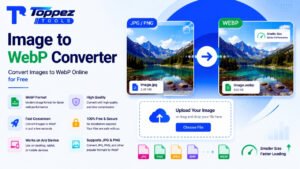
Convert JPG, PNG, and other supported images to WebP online for free with fast processing and high-quality output.
Convert images to WebP online for free with Toppez Tools. Upload JPG, PNG, and other supported image formats and quickly convert them to the modern WebP format. WebP can help create smaller image files for websites while maintaining good visual quality. No complicated software or installation is required.
Smart Images to WebP Converter
Convert any image format (JPG, PNG, GIF, BMP, SVG, TIFF) into next-gen WebP format for 3x faster website load speeds.
Drag & drop any image here
Supports JPG, PNG, GIF, BMP, SVG, TIFF, AVIF (Max 30MB)
WebP is a modern image format designed for efficient web delivery. Converting images to WebP can help reduce file sizes while maintaining good visual quality, making it a popular choice for websites, blogs, online stores, and digital content.
Our Image to WebP Converter provides a simple way to convert supported images to WebP directly from your browser. Upload your image, start the conversion, preview the result, and download the WebP file.
Whether you need to convert JPG or PNG images for a website, optimize images for faster page loading, or prepare graphics for modern web projects, this online converter makes the process quick and straightforward.
Key Features of Toppez Tools - Image to Webp converter:
1. Convert Images to WebP Online
Convert supported image files to the modern WebP format directly from your browser. The tool eliminates the need for complicated image-editing applications.
2. JPG to WebP Conversion
Convert JPG and JPEG images into WebP format quickly. This is useful when preparing photographs and other website images for better web delivery.
3. PNG to WebP Conversion
Convert PNG images to WebP while preparing graphics, illustrations, and web assets for modern websites and applications.
4. Free Online Converter
Use the Image to WebP Converter without purchasing professional image-conversion software. It is designed for convenient everyday image conversion.
5. Fast Conversion
Convert images in just a few simple steps. The streamlined interface helps you complete common image-conversion tasks quickly.
6. High-Quality Output
The converter is designed to produce WebP images with good visual quality. Depending on the conversion settings and source image, the resulting file size and quality may vary.
7. Web-Friendly Image Format
WebP is widely used for web images because it can provide efficient compression and help reduce image file sizes compared with some traditional formats.
8. Simple Interface
No advanced image-editing skills are necessary. Upload your image, convert it, preview the result, and download the WebP file.
9. Browser-Based Tool
Access the converter through a compatible web browser without installing dedicated desktop software.
10. Convenient for Website Owners
Web designers, bloggers, developers, marketers, and website owners can use the tool to prepare images for websites and digital projects.
How to Use the Image to Webp converter?
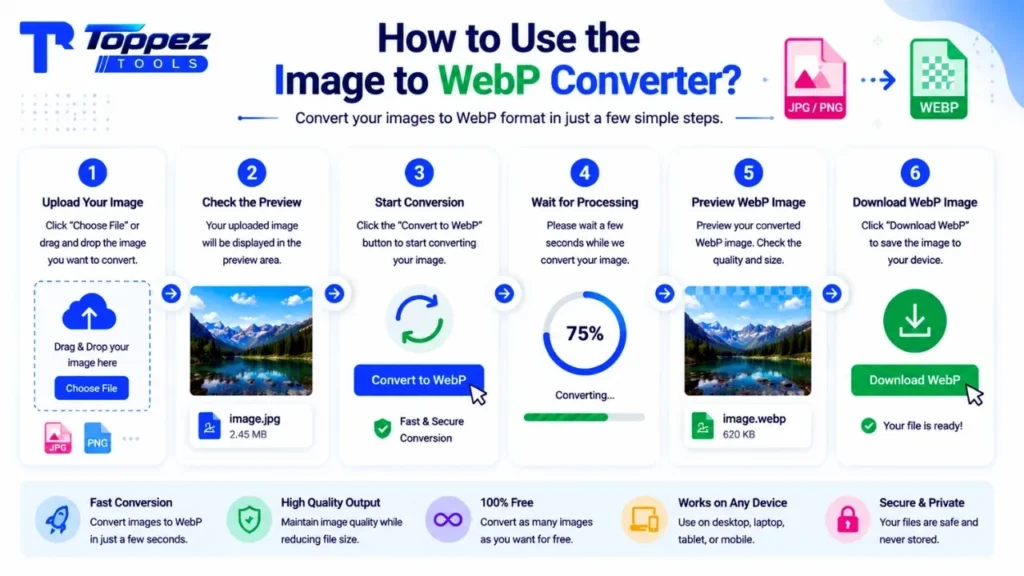
Convert your images to Webp with Toppez Tools is quick and simple:
1. Upload Your Image
Click Choose File or the upload area and select the image you want to convert from your device.
2. Check the Image Preview
After uploading, your image will appear in the preview area. Check that you have selected the correct file before starting the conversion.
3. Start the Conversion
Click the Convert to WebP button to begin converting your image into WebP format.
4. Wait for Processing
The tool will process the image and create a WebP version. Processing time may vary depending on the image and device.
5. Preview the WebP Image
Check the converted image to make sure the result looks correct before saving it.
6. Download the WebP File
Click Download WebP to save the converted file to your device.
Why Use This Image to WebP Converter?
Converting images to WebP can be useful when preparing visual content for modern websites. Instead of using complicated desktop software for a simple format conversion, an online converter provides a faster and more convenient workflow.
1. Easy to Use
The simple interface allows you to convert images without professional image-editing knowledge.
2. Free Online Tool
Convert supported images to WebP without needing expensive image-conversion software.
3. Saves Time
Complete the conversion in a few straightforward steps instead of manually exporting images through complex editing applications.
4. Web-Friendly Output
WebP is designed for efficient web image delivery and is commonly used for websites and online applications.
5. Useful for Website Optimization
Smaller image files can potentially reduce the amount of data browsers need to download, which can be helpful for website performance.
6. Multiple Image Uses
Use converted WebP images for blogs, websites, product pages, landing pages, banners, thumbnails, and other digital projects.
7. No Complicated Software
Access the tool directly from your browser instead of installing a dedicated image converter.
Supported Formats & Specifications:
| Feature | Specification |
|---|---|
| Input Formats | JPG, JPEG, PNG, GIF, BMP, SVG, TIFF, AVIF |
| Output Format | WebP |
| GIF Support | First frame / static GIF conversion |
| WebP Encoding | Lossy & Lossless |
| Quality Control | Interactive quality slider: 10%–100% |
| Alpha Transparency | Supported and preserved where applicable |
| Real-Time Savings Tracker | Shows bytes saved and percentage saved instantly |
| File Size Comparison | Original vs. converted WebP size |
| Processing Method | 100% client-side browser processing |
| Server Upload | No server-side image upload |
| Privacy | Images remain on the user’s device during browser-based processing |
| Conversion Preview | Real-time/instant preview where supported |
| Output Quality | Adjustable according to selected WebP quality setting |
| Installation Required | No |
| Device Support | Desktop, laptop, tablet, and mobile browsers |
| Internet Requirement | Required to access the online tool; conversion is performed client-side |
| Cost | Free |
Common Mistakes When Converting Images to WebP:
1. Using a Low-Quality Source
Starting with a heavily compressed or low-resolution image can produce a poor-looking WebP file. Whenever possible, use the highest-quality original image available.
2. Confusing Conversion with Compression
Converting an image to WebP changes its format. It does not automatically guarantee a particular file size reduction.
3. Ignoring Transparency
If you are converting PNG graphics with transparent backgrounds, check that your conversion workflow preserves transparency when needed.
4. Choosing an Unsuitable Quality Level
If your tool provides quality controls, extremely aggressive compression may reduce visual quality. Choose a suitable balance between file size and appearance.
5. Not Checking the Final File
Always preview the converted WebP before using it on your website or project.
6. Uploading an Already Compressed Image
Repeatedly converting and compressing images can gradually affect quality. Start with the original whenever possible.
7. Forgetting Website Compatibility
Modern browsers widely support WebP, but if your website must support older environments, check your project’s compatibility requirements.
Frequently Asked Questions (FAQs):
An Image to WebP Converter is an online tool that changes supported image files such as JPG and PNG into WebP format. WebP is a modern image format commonly used for websites because it can provide efficient image compression while maintaining good visual quality.
Yes, the tool is designed to provide free online image-to-WebP conversion. You can upload a supported image, convert it to WebP, preview the result, and download the converted file without requiring professional image-editing software.
Yes. If JPG and JPEG are supported by your tool, you can upload a JPG image and convert it to WebP format. This can be useful for preparing photographs and other images for websites and digital projects.
Yes. Supported PNG images can be converted to WebP format. This can be useful for website graphics, illustrations, and images where a more web-friendly format is preferred.
WebP is designed for efficient image delivery on the web. Depending on the source image and compression settings, converting an image to WebP can reduce file size while maintaining good visual quality, potentially helping websites deliver images more efficiently.
The result depends on the conversion method and settings. Lossy WebP compression can reduce file size with some quality loss, while lossless WebP can preserve image information but may produce larger files. The source image also affects the final result.
Yes. WebP supports transparency, making it suitable for graphics that require transparent backgrounds. However, the actual result depends on the source image and how the conversion tool handles transparency during export.
Yes. WebP is widely used for website images and is supported by modern browsers. It can be used for photographs, graphics, thumbnails, product images, banners, and many other types of web content.
No. An online Image to WebP Converter can be accessed through a compatible web browser. You can upload your image, convert it, and download the WebP result without installing dedicated image-conversion software.
There is no single format that is best for every situation. WebP can provide efficient compression and supports transparency, while JPG and PNG remain useful for many workflows. The best format depends on image type, quality requirements, compatibility, and intended use.
Related Tools:
🔥 Popular Tools on Toppez
Explore our most frequently used utilities across the platform